TB.One > Media > Providing Media via the Graphical User Interface > Media (Master Data Creation)
Media (Master Data Creation)
In the product's "Media" tab, upload the media for your products and articles and classify them as product or article media. TB.One supports various media, such as image or PDF files. Most channels, however, will only accept image files (media type "IMAGE"). Article media are only valid for certain variants (e.g. color blue), while product media represent the entire product (e.g. a stack image).
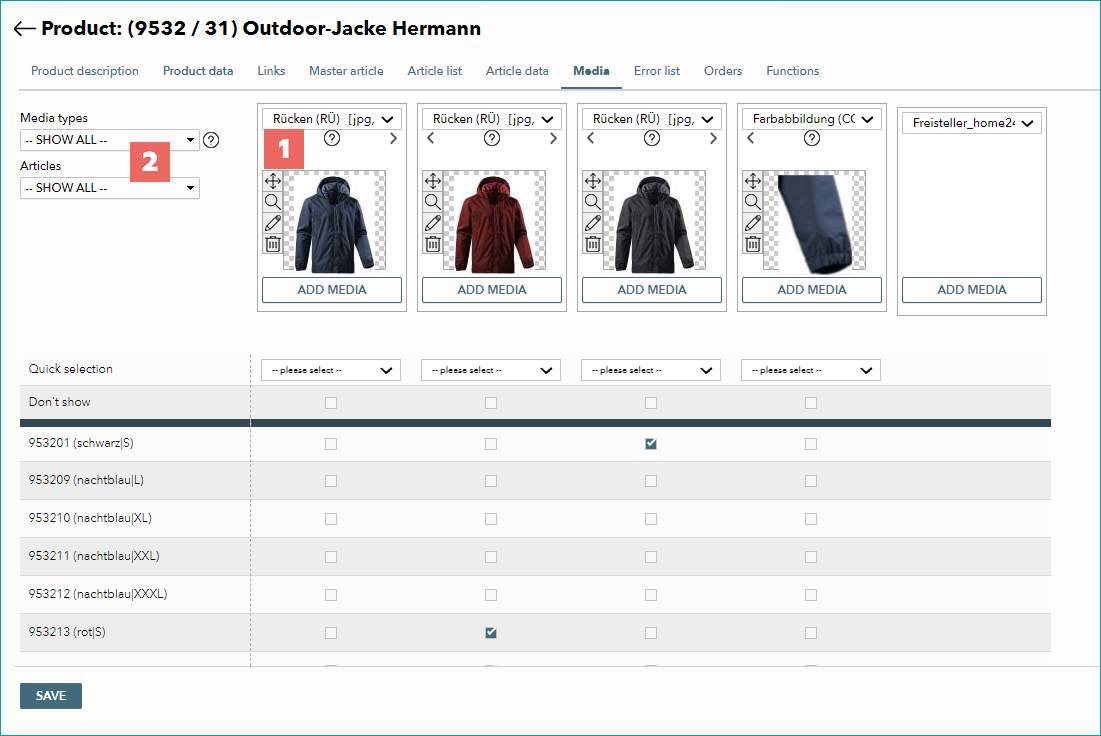
The boxes (1) above the article list symbolize media groups and may contain several pieces of media each. If you, for example, have a set of images that shows one article from multiple angles, you may add them to a single media group. This allows you to assign the entire media group to articles at once. Images will be exported to the channel in the order in which they are stored. Keep in mind that some channels limit the number, type or style of images which may be submitted. If necessary, you may create your own media types, which you can configure so they are only exported to certain channels.
A large number of images may increase a product's loading time in TB.One. You can, therefore, use the two filters on the left (2), which allow you to filter for certain media types and/or articles. You can configure a preset for this filter in your user account settings ("My Account" in the top right corner of TB.One). This way, the menu will already be filtered whenever you open it. Keep this in mind whenever some images seem to be missing from the menu!
For detailed guidelines on how to add and configure media see the following pages:
•Article/Product media and editing options
•Providing Compliant AI-Generated media
For further information, see also:
•Manual master data creation - overview