TB.One > Setup, Configuration & User Accounts > Dynamic Storage Management > REGISTRATION OF INCOMING GOODS
REGISTRATION OF INCOMING GOODS
1. MANUAL STOCK REGISTRATION
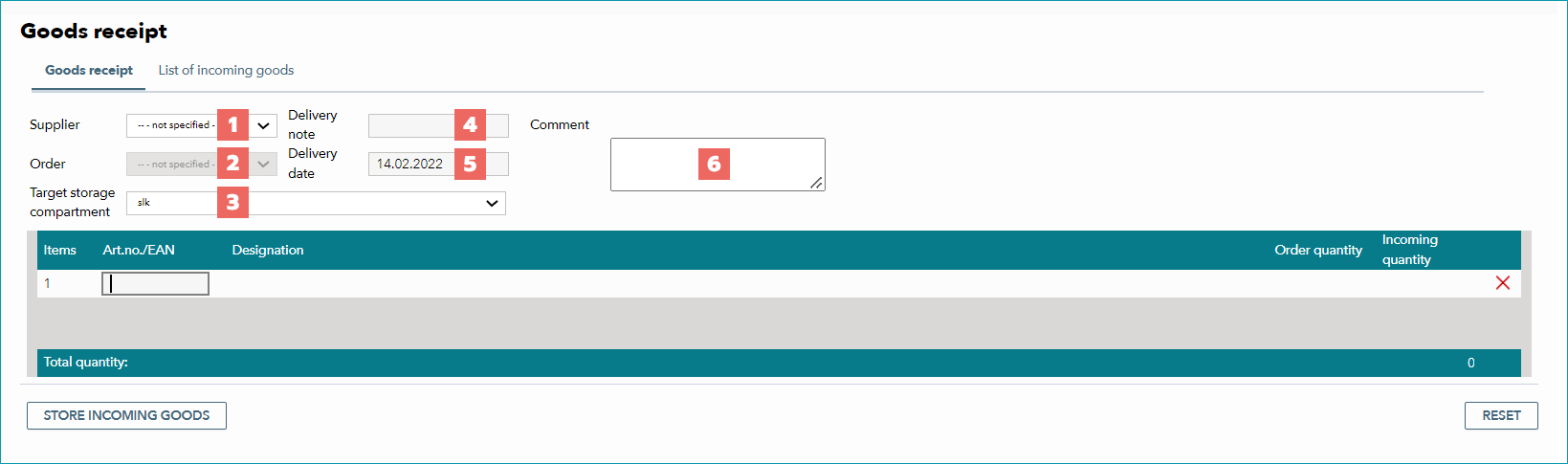
In TB.One, incoming goods are registered at "Storage > Goods receipt" on the tab "Goods receipt". You can configure the following parameters at goods receipt to supply additional information during the warehousing of goods:
NUMBER |
DESCRIPTION |
|---|---|
|
Depending on the edition of TB.One you are using, supplier management may be available. In that case, a supplier can be assigned to incoming deliveries. |
|
Depending on the edition of TB.One you are using, you may have the option to import supplier orders. In this case, expected articles are listed in the import and their arrival is confirmed by scanning them. |
|
Bin location to which the incoming goods are booked. The bin location for goods receipt is set as the default value. |
|
Field for entering the number of the manufacturer's/supplier's delivery note. |
|
Field for the delivery date. Be default, the field contains the current date. |
|
Here, you can enter an internal comment/note regarding the delivery. |


Once you have configured these settings, scan the EANs/article numbers of the delivered articles to register them as incoming goods. Identical EANs/article numbers will be subsumed under one item/position. If an unknown/faulty bar code is scanned, an error message will be displayed on the top right:

Once you have processed the entire delivery, finish the registration by clicking on the button "Store incoming goods" in the lower left corner. A history of booked deliveries can be found on the tab "List of incoming receipts".
ATTENTION: |
2. STOCK REGISTRATION VIA CSV IMPORT
Stock and stock changes can alternatively be provided by importing a CSV file. In this case, it is sufficient to transfer the relevant pieces of information. If you use dynamic warehouse management, it is not sufficient to identify the article by supplying the article number or EAN. You also need to indicate its bin location. Because designations for bin locations have to be unique across all warehouses, bin location and EAN/article number together clearly define which article should be booked/stored where.
TIP: The recommended format for timestamps is "yyyymmdd_hhmmss". |
File structure examples:
a_nr |
a_stockchange |
a_stockchange_area |
|---|---|---|
123 |
+3 |
01-001-2354 |
345 |
-4 |
01-001-2355 |
Alternatively:
a_ean |
a_stockchange |
a_stockchange_area |
|---|---|---|
1234567890123 |
+3 |
01-001-2354 |
2345678901234 |
-4 |
01-001-2355 |
File structure when referencing multiple warehouses:
a_nr |
a_stockchange[key1] |
a_storage_area[key1] |
a_stockchange[key2] |
a_storage_area[key2] |
|---|---|---|---|---|
123 |
+2 |
01-001-2354 |
+1 |
02-001-2354 |
345 |
-1 |
01-001-2355 |
-3 |
02-001-2355 |
Alternatively:
a_ean |
a_stockchange[key1] |
a_storage_area[key1] |
a_stockchange[key2] |
a_storage_area[key2] |
|---|---|---|---|---|
1234567890123 |
+2 |
01-001-2354 |
+1 |
02-001-2354 |
2345678901234 |
-1 |
01-001-2355 |
-3 |
02-001-2355 |
For further information, see also:
•Dynamic storage management - overview
•Distribution from goods receipt to other bin locations
•Order processing with dynamic storage management