TB.One > Setup, Configuration & User Accounts > FAQ - Setup, Configuration & User Accounts > How to Configure the Scan Desktop
How to Configure the Scan Desktop
The "Scan Desktop" ("Orders > Scan Desktop") is used for processing orders via barcode scanner. This helps warehouse staff process orders quickly and easily. If you use this feature, you need to create barcodes for all relevant information, e.g. return reasons and return states, product labels, order data sheets, etc.
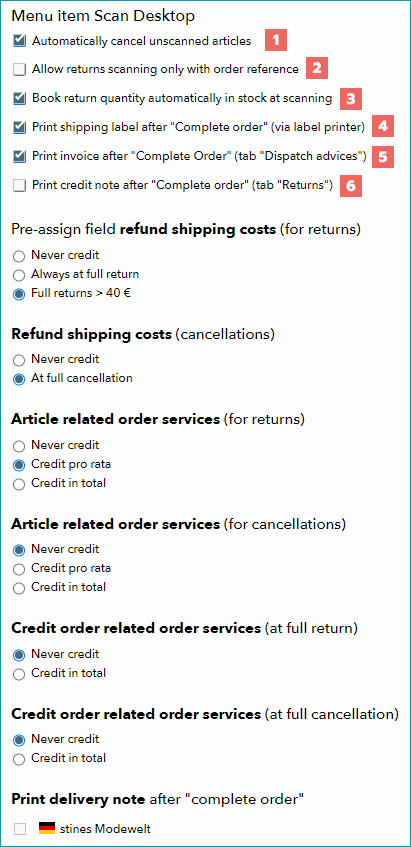
Before using the Scan Desktop, configure it at "Admin > System settings > Order processing" in the section "Menu item Scan Desktop". Define how shipping and article/order-related services should be reimbursed during (full) returns/cancellations. Select all channels for which you would like to print delivery notes when completing your orders.
FIELD |
DESCRIPTION |
|---|---|
|
All articles that were not scanned for an order are automatically canceled. If this option is not active, you must report each article as shipped or canceled manually. Note that some channels permit cancellations only at the item (i.e. position) level, not at the article level. If the channel does not allow partial cancellations, the order can't be completed via the Scan Desktop. |
|
If this option is enabled, the option "without order" on the Scan Desktop's "Returns" tab will be deactivated (the option is only relevant for a few channels). |
|
This option determines whether returned stock is automatically added to the stock numbers. |
|
If "TB.Print" is installed and a DHL number range is stored in the channel settings, the shipping labels will be printed automatically with each dispatch advice. The label contains the general or channel-specific return address as the sender's address. Note that label printing is only possible for shipping with DHL. |
|
After completing the dispatch advice in the Scan Desktop, invoices are printed automatically. Additional forms provided by the channel and documents you have configured will also be printed. |
|
After completing return messages in the Scan Desktop, a cancellation invoice will be created automatically. |


