TB.One > Setup, Configuration & User Accounts > Default Values > Default Values for Article Data
Default Values for Article Data
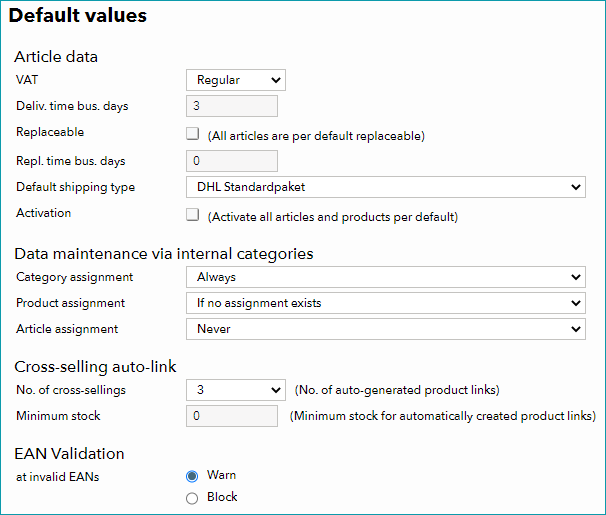
The data entered in the section "Article Data" at "Admin > Default values" will be pre-assigned to newly created products/articles. Choose the setting that applies to the majority of your products/articles to facilitate manual data maintenance. The default values may be overwritten with custom values in the individual product or article data.
FIELD |
MEANING |
|---|---|
VAT |
TB.One assumes that the standard VAT rate is 19%. However you can choose between "Regular" (19%), "Reduced" (7%) and "Free" (0%) for your default setting. |
Delivery time business days |
Enter the preset for your delivery time. The default setting is 1. However, most channels expect a realistic time frame, and you also need to account for shipping time. If individual channels calculate additional days for shipping or cross-border shipments , you can adjust the delivery times to make sure the right amount of days is shown to the customers. |
Replaceability |
If the majority of your assortment consists of basic products that can be reordered at any time, activate the replaceability. In this case, you need to indicate the amount of time it will take to re-stock sold-out articles. Usually, a standard stock number is exported for such articles, even if there is currently no stock. The replacement time will then be added to the delivery time. If you mainly sell commodities in limited quantities that can not be replaced, deactivate the replaceability and enable it for individual articles where needed. |
Standard shipping |
Specify your main shipping type. In the basic configuration you can use "DHL Standard Package" ("DHL Standardpaket"), "DHL long-package" ("DHL Langpaket"), "Bulky goods (curbside delivery)" ("Sperrgut (bis Bordsteinkante)") or "no DHL shipping" ("Kein DHL Versand"). The list will show additional options if you create more shipping types. If you use a different agency (i.e. not DHL) for shipping, create the package type(s) and shipping types as needed and select the appropriate entry from the list. |
Activation |
In this menu, you can specify the activation status of newly created articles. If you check the box, newly created articles are activated for all channels by default. If necessary, deactivate them for individual channels during the creation process. You can also activate articles via the bulk editing feature or via import. For bulk editing it is recommended to create a flag or an attribute that allows you to filter the article list. You can activate all articles in the filter results simultaneously. |
For further information, see also:
•Overview: defining default values